

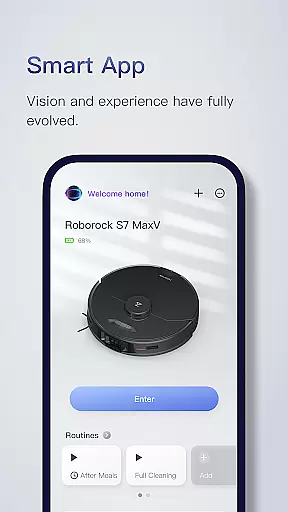
Roborock is a cutting-edge home cleaning solution that combines advanced hardware with intelligent software. The app provides complete control over your Roborock robot, allowing you to manage everything from cleaning schedules to suction strength. With features like Precision LIDAR navigation, AI-based obstacle avoidance, and automatic home mapping, it ensures efficient and customized cleaning for every home.
The app supports multi-level mapping, enabling tailored cleaning for different floors. You can set up to four unique maps, create no-go zones, and schedule specific cleaning routines for each room. Whether you need stronger suction in the nursery or quieter operation during work hours, Roborock adapts to your lifestyle seamlessly.
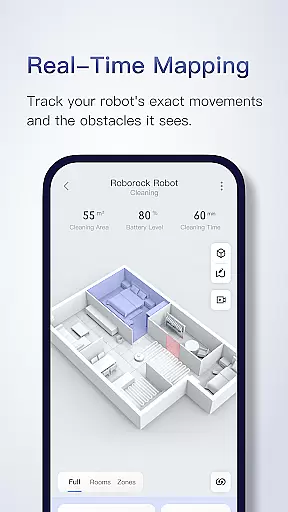
Roborock's real-time viewing feature lets you monitor your robot's progress as it cleans, showing the exact path taken and obstacles avoided. This combination of smart technology and user-friendly controls makes Roborock an ideal choice for modern households seeking convenience and precision in home maintenance.
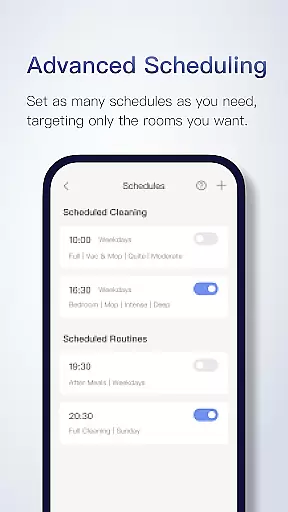
Roborock offers a comprehensive suite of features designed to enhance home cleaning efficiency. Its Seriously Smart Mapping technology creates detailed floorplans after the robot's first run, automatically dividing rooms for customized cleaning. Advanced Scheduling allows users to set multiple cleaning routines—hourly, daily, or weekly—targeting specific areas like the kitchen after meals or the entire house when unoccupied.
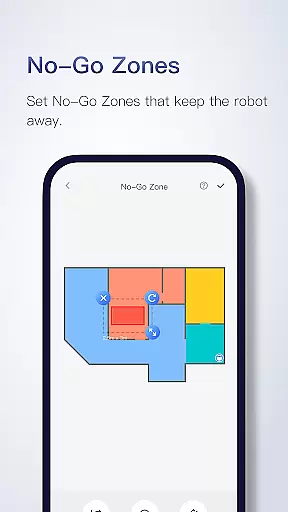
Customizable Cleaning options let you adjust suction power and water flow based on room requirements. For instance, increase suction in high-traffic areas or reduce noise during quiet times. Zone Cleaning enables targeting up to five zones with repeat passes for stubborn dirt, while No-Go Zones and Invisible Walls keep the robot away from delicate items or thick carpets without additional hardware.
Multi-Level Mapping supports up to four unique maps, ensuring seamless transitions between floors. Real-Time Viewing provides live tracking of the robot’s movements, offering insights into its cleaning path and obstacle avoidance. These innovative features collectively deliver a smarter, more adaptable cleaning experience tailored to diverse household needs.
Roborock offers an extensive range of features that cater to various aspects of home management, making it a comprehensive lifestyle application. The app controls Roborock robots which are equipped with advanced technologies like PreciSense, Sensient, OpticEye, ReactiveAI, and VibraRise, each serving a unique purpose in home cleaning.
The app's functionality spans across multiple areas including smart mapping, scheduling, customizable cleaning, zone cleaning, no-go zones, multi-level mapping, and real-time viewing. These features collectively ensure that users can manage their home cleaning routines down to the smallest detail.
Users benefit from the ability to customize cleaning schedules and preferences for different rooms, set up no-go zones to protect delicate items, and even manage cleaning across multiple floors. This wide array of functionalities ensures that Roborock fits seamlessly into various household environments and meets diverse cleaning needs.
By covering such a broad spectrum of home cleaning and management tasks, Roborock demonstrates its commitment to enhancing users' lifestyles through technology, providing convenience, efficiency, and peace of mind.
The content provided by Roborock is both authentic and credible, drawing on cutting-edge software and hardware technologies to deliver reliable home cleaning solutions. Each feature listed, from Precision LIDAR navigation to sensor matrices and artificial intelligence, reflects the technological sophistication embedded in Roborock products.
Roborock's dedication to accuracy is evident in features like Seriously Smart Mapping, Advanced Scheduling, Customizable Cleaning, Zone Cleaning, No-Go Zones, Multi-Level Mapping, and Real-Time Viewing. These features are not only innovative but also practically implemented to enhance user experience.
Furthermore, Roborock provides clear information about feature compatibility across different models, ensuring transparency and helping users make informed decisions based on their specific needs. This level of detail underscores the authenticity of the content presented within the app.
With customer service options available via phone and email, Roborock assures users of ongoing support and expertise, reinforcing the credibility of the information and services offered through the app.
Advanced AI navigation
Customizable cleaning modes
Multi-level mapping support
Real-time progress tracking
Efficient scheduling system
Limited device compatibility
Premium price point
Feature restrictions by model
Occasional connectivity issues
Steep learning curve

Big bold weather watch face with dynamic backgrounds and 3 complications
 4.1
4.1
Smart controls for your Ember Smart Mugs
4.10
Duo Watch Face (animated)
4.5
Discover the "To Be a Christian" App: Your Guide to Deepening Faith!
5.00
Connect to your Shark ROBOT™ from anywhere using the SharkClean™ App.
3.60
The cutest Autumn watchface featuring the adorable Mr. Squirrel
4.0
Mixing Colors for Menswear
4.20
Subwoofer school’s in session! You’ve now enrolled into KICKER U.
3.80
Just play, earn rewards, fetch gift cards, and turn gaming into real payouts!
4.80
Have your Tehillim with you at all times
4.70
Smart & Healthy Living
4.60
Unique "Isometric" style digital watch face for Wear OS
4.50
Earn money & gift cards when you take surveys, play games, scan receipts & more.
4.50
Discounts, savings, and rewards
4.20
Unique BIG BOLD TIME with amazing colors and customisations.
3.70
Paranormal EVP, Ghost Box, Spirit box, ITC, Haunted, Spirit communication device
3.70
Unique informative Dial with Live Moon Phase at a glance!
3.60
Going above and beyond known spirit communication
3.60
BILT interactive 3D instructions help you get the job done right
3.50


User Reviews