

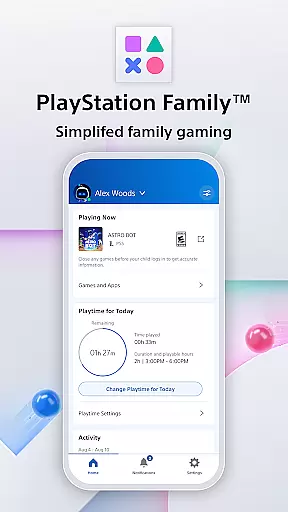
PlayStation Family is a comprehensive parenting tool designed to simplify family gaming management. The app provides real-time insights into your child's gaming activity, ensuring they engage with age-appropriate content. With customizable playtime controls and parental notifications, parents can seamlessly integrate gaming into their family routine while maintaining full oversight.
The app offers detailed activity reports, giving parents visibility into their child's online status, current games, and weekly playtime trends. Additionally, PlayStation Family allows for the customization of privacy settings and spending limits, empowering parents to manage social interactions and in-game purchases effectively. This ensures a balanced and safe gaming environment for children.
Designed for busy parents, PlayStation Family delivers essential information directly to your smartphone. Whether approving extra playtime requests or setting monthly spending limits, this app enables parents to make informed decisions that promote healthy gaming habits. By combining robust parental controls with user-friendly features, PlayStation Family creates a worry-free gaming experience for the whole family.
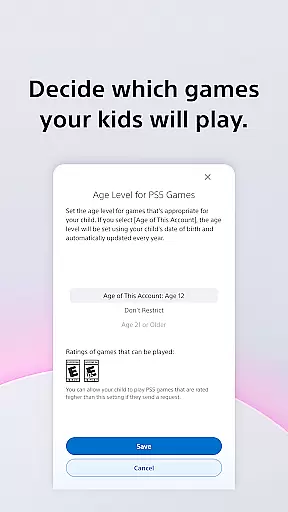
PlayStation Family stands out with its robust set of features tailored for modern parenting needs. One of the key highlights is the easy setup process, which includes age-based parental control recommendations. Parents can effortlessly create accounts for their children and define access permissions for specific games, ensuring only appropriate content is available.
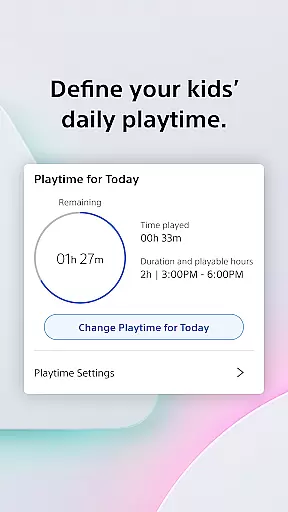
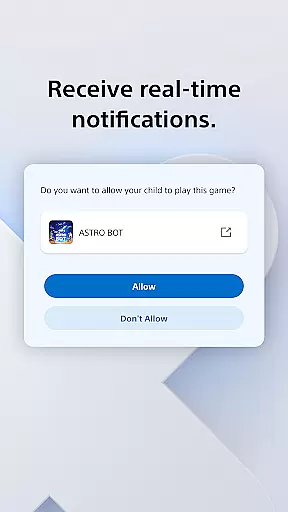
The app excels in providing customizable playtime options. Parents can schedule gaming sessions around family routines, such as homework or meal times, promoting a balanced lifestyle. Real-time notifications further enhance control by allowing instant responses to extra playtime requests directly from smartphones, giving parents ultimate authority over gaming activities.
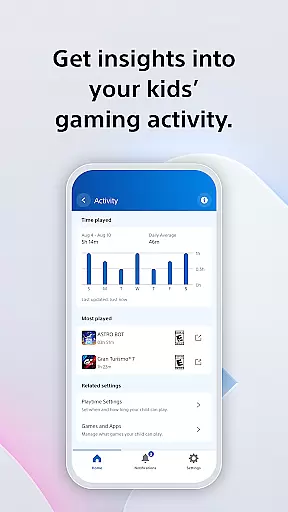
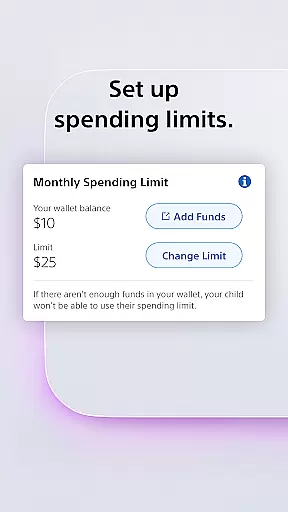
Beyond basic controls, PlayStation Family offers advanced features like detailed activity reports and social interaction management. The activity report provides valuable insights into children's gaming patterns, while privacy settings enable parents to regulate how their children connect with others. Additionally, the spending management feature lets parents set monthly budgets and monitor wallet balances, ensuring controlled access to PlayStation Store purchases. These comprehensive tools collectively create a safer and more structured gaming environment.
The PlayStation Family app offers comprehensive coverage of essential lifestyle management features for parents overseeing their children's gaming activities. This includes customizable playtime settings, age-appropriate content filters, and real-time notifications that integrate seamlessly into daily family routines.
With its robust set of tools, the app allows parents to define specific periods for gaming, ensuring it aligns with other important activities like homework and meals. The app also provides detailed activity reports, giving insights into the child's gaming habits and helping parents make informed decisions about their playtime.
Beyond just managing playtime, the app extends its functionality to cover social interactions and spending controls. Parents can customize privacy settings and manage how their children connect with others online, as well as control monthly spending limits in the PlayStation Store. These features collectively ensure a balanced approach to digital entertainment within the family setting.
The PlayStation Family app ensures content authenticity by providing verified and accurate information directly from Sony Interactive Entertainment. As a trusted source, the app delivers real-time updates and notifications regarding children's gaming activities, reinforcing its reliability as a parenting tool.
Expert credibility is evident through the app's adherence to PlayStation's terms of service and its integration with official PlayStation platforms. By offering features such as age-based parental control recommendations and customizable privacy settings, the app reflects Sony's commitment to fostering safe and responsible gaming environments.
Additionally, the app's ability to manage spending and view wallet balances adds another layer of credible oversight. Parents can trust that the financial data presented is accurate and secure, allowing them to set appropriate spending limits for their children. This level of expert-backed functionality underscores the app's value in maintaining a trustworthy digital ecosystem for families.
User-friendly interface
Real-time notifications
Customizable playtime
Detailed activity reports
Robust parental controls
Limited to PlayStation devices
Requires constant internet
Some features PS4/PS5 only
No cross-platform support
Monthly spending limits

The Work of Byron Katie— the mobile app for inner peace.
 4.40
4.40
Get roadside help, discounts, travel tools & more — AAA is with you everywhere.
4.80
What is my face shape? Find out your face shape from picture, see fitting frames
3.90
Discover your Nationality, Family Origin, and Ancestry from one selfie
4.50
Falling Fruit is a massive collaborative map of food in our cities.
3.20
A unique and customizable watch face which rotates its layout every minute.
4.80
AAA Mobile provides on-the-go access to the services you know and trust.
4.60
Decorate your home screen with custom icons, color widgets, themes & wallpapers
4.70
Just play, earn rewards, fetch gift cards, and turn gaming into real payouts!
4.80
Play. Earn. Repeat. Get rewarded for playing mobile games. Welcome to Mobius!
4.80
Get the news, events and savings that matter to you with AARP Now.
4.80
Pay your rent, submit work orders and much more with the RentCafe Resident App.
4.70
Crochet made easy: step-by-step tutorials, beginner patterns & projects
4.60
Unique "Isometric" style digital watch face for Wear OS
4.50
The go to app for taking unlimited notes!
4.50
Paranormal Spirit Bell Trigger Device
4.30
Mixing Colors for Menswear
4.20
The cutest Autumn watchface featuring the adorable Mr. Squirrel
4.2
Wear your favorite memories, loved ones, pets or travel photos on your watch
4.0

User Reviews