

Lithium Pro is an advanced upgrade package for the free Lithium app, designed specifically for book enthusiasts who want enhanced functionality and customization options. This app unlocks exclusive Pro features within the main Lithium application, offering users a more personalized reading experience.
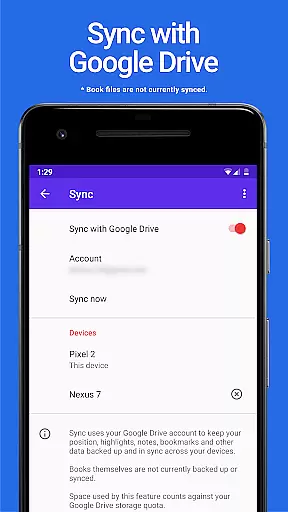
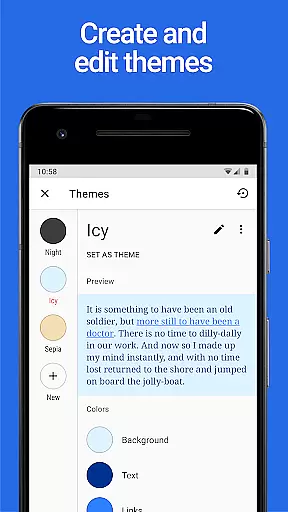
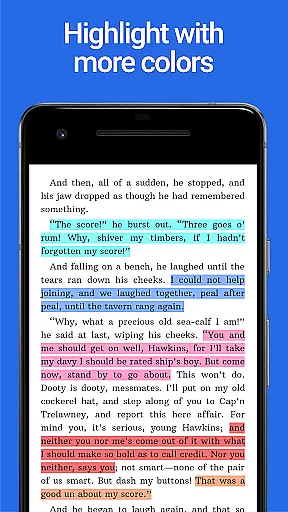
Key features include automatic data synchronization across devices using Google Drive, complete customization of themes with adjustable colors, and extended highlight options. These capabilities make it an ideal choice for readers who value both convenience and personalization in their digital library management.
The app's ability to sync reading progress and custom settings across multiple devices ensures a seamless experience for users who switch between their phone, tablet, and other gadgets. This feature alone significantly enhances the value proposition for avid readers who require flexibility and consistency in their reading habits.
The Lithium Pro upgrade offers several distinctive features that set it apart from standard reading applications. The most notable is its comprehensive synchronization capability, which uses Google Drive to maintain consistent reading data across all user devices, ensuring your place and preferences are always up-to-date.
Another significant feature is the advanced theme customization system. Users can create and modify their own display themes, adjusting background colors, text shades, and hyperlink hues to their exact preferences. This level of personalization extends to additional highlight colors, providing more options for note-taking and reference marking.
The combination of these features creates a powerful tool for readers who demand both functionality and personal expression in their reading applications. While current limitations exist regarding book file backups, the existing feature set provides substantial value for users seeking enhanced control over their reading experience.
When it comes to e-books, the size of the library and the authenticity of copyrights are crucial factors for any avid reader. Lithium Pro ensures that users have access to a vast collection of e-books, all verified for copyright authenticity.
The app leverages Google Drive to keep your data backed up and in sync across multiple devices, ensuring you never lose your place in your digital library. Although book files themselves aren't currently backed up or synced, this feature provides peace of mind for your reading progress and settings.
By integrating with Lithium, the free version of the app, Lithium Pro activates advanced features that enhance your reading experience while maintaining legal integrity and respect for authors' rights.
Format compatibility is essential for readers who switch between devices or prefer different file types. Lithium Pro supports a wide range of e-book formats, making it versatile and user-friendly.
After upgrading, users can customize their reading experience by adjusting display settings. This includes changing page background color, text color, and link colors through custom themes, which demonstrates the app's commitment to format adaptability.
With additional features like more highlight colors and future updates planned, Lithium Pro ensures that no matter what device you're on, you'll enjoy a seamless and personalized reading experience.
Seamless cross-device syncing
Extensive theme customization
Additional highlight colors
Google Drive integration
Enhanced reading experience
No book file backup
Separate app required
Higher cost than free version
Limited free features
Complex setup process

Sea tide predictions for all coastal U.S. locations.
 4.3
4.3
Plan of Life that Saint Josemaría recommended
4.80
Translate into 100+ languages with the world’s most accurate AI translator.
4.70
8 Dr. Seuss short stories in 1 app!
4.70
Enjoy daily devotionals, Bible verses, audio courses, and more.
4.80
Daily thoughts, meditations, and prayers for living a sober life in recovery.
4.90
A highly sophisticated app for all of your mobile reading—any format, any time
4.50
Follow complex state CCW permit laws and lawfully carry firearms in each state.
4.80
ARC Raiders Companion: Map, Quests, ARC/Item Info. Track everything instantly!
4.00
Flora of Virginia Project (www.floraofvirginia.org)
5.00
Personalized Chat with Bible
4.80
Daily Devotional Widgets & Hourly Verses. Listen to Bible & Watch Holy Stories
4.70
Words spoken by native English speakers and full definitions.
4.60
F9 Cookbook Mobile App
4.60
Bible Spiritual Companion
4.40
“It is fun to have fun, but you have to know how!”
4.40
Cute bedtime story for kids
4.30
Read popular romance books and web novels on the fantastic ebook reader
3.50
Battle Royale Chapter 5 Season 2 HD Wallpapers Emotes Skins and BattlePass
3.00
User Reviews