

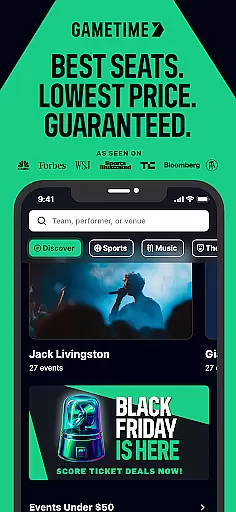
Gametime is a leading mobile application designed to help users secure tickets for live events at optimal prices. The app specializes in offering deals for sports games, concerts, festivals, comedy shows, and theatrical performances. With its unique feature of decreasing ticket prices as the event time approaches, Gametime ensures users can access last-minute tickets conveniently.
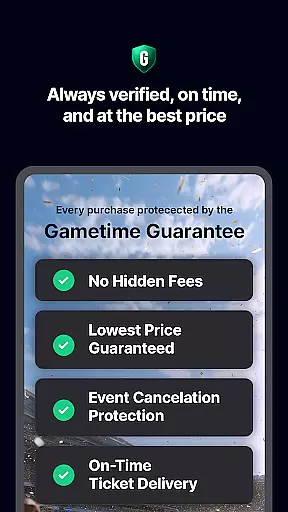
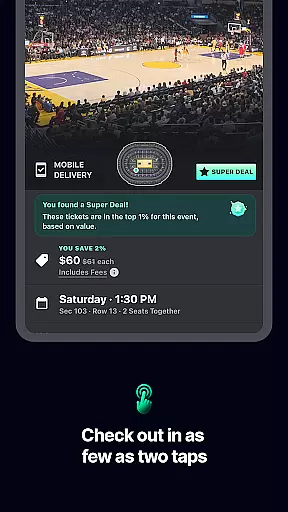
One of the standout features of Gametime is its Ticket Coverage service, which provides comprehensive protection and benefits such as the Lowest Price Guarantee and Lightning Refunds. This service enhances user confidence when purchasing tickets. Additionally, the app's intuitive interface allows users to view panoramic seat views, compare prices, and complete purchases with a simple two-click checkout process.
The app caters to environmentally conscious users by delivering tickets digitally, eliminating the need for paper tickets. Gametime also supports easy ticket sharing with friends via mobile devices, making group outings seamless. Whether you're looking to attend a major sporting event or a popular concert, Gametime offers a reliable and efficient solution for all your ticketing needs.
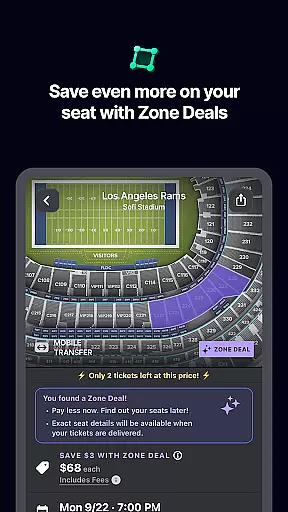
Gametime stands out due to its robust set of features tailored to enhance the ticket-buying experience. One of the primary functionalities is the dynamic pricing model, where ticket prices decrease as the event start time approaches. This allows users to take advantage of significant discounts, especially for last-minute purchases. Furthermore, the app provides Special Zone Deals that offer additional savings on select sections.
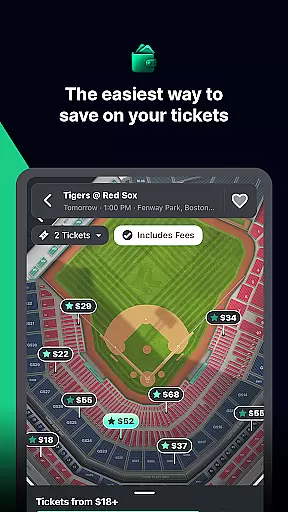
The app includes an advanced seat mapping system that lets users explore venue layouts and compare seat locations and prices effortlessly. Gametime also offers panoramic photos from various sections, ensuring users know exactly what view to expect. The inclusion of Gametime Ticket Coverage adds extra value, providing benefits like the Lowest Price Guarantee and Job Loss Protection, ensuring peace of mind for every purchase.
Usability is at the core of Gametime's design. The app boasts a streamlined two-click checkout process, enabling swift transactions without hidden fees. Mobile ticket delivery and sharing capabilities further enhance convenience, allowing users to manage their tickets entirely through their smartphones. These features collectively make Gametime a top choice for anyone seeking an efficient and reliable ticketing solution.
Task creation and detail customization are essential features for any event management app like Gametime. This functionality allows users to create personalized event tasks with specific details, ensuring a tailored experience for each user. With this feature, users can input exact preferences such as seating arrangements, budget limits, and event types, making the ticket purchasing process more efficient and targeted.
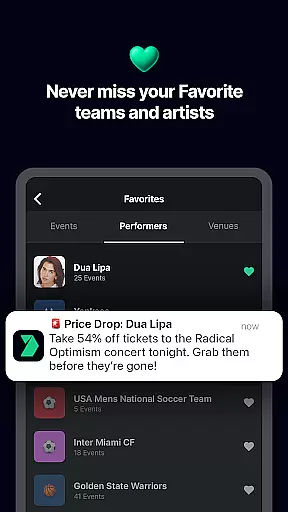
Gametime implements task creation by enabling users to set filters and alerts for their preferred events. Users can specify their desired price range, seat location, and even the type of event they wish to attend. The app then provides real-time updates and notifications when tickets matching these criteria become available. This ensures that users never miss out on an opportunity to attend their favorite sports games, concerts, or theater shows.
The benefits of this feature are manifold. Firstly, it saves time by streamlining the search process, presenting only the most relevant options. Secondly, it enhances user satisfaction by catering to individual preferences, thus increasing the likelihood of securing the best possible tickets. Lastly, it adds a layer of personalization that makes the entire ticket-buying experience more engaging and enjoyable.
In summary, task creation and detail customization in Gametime empower users to take control of their event planning. By offering precise tools for specifying preferences and receiving timely updates, the app not only simplifies the ticket acquisition process but also enriches the overall user experience, making it a go-to solution for live event enthusiasts.
Reminder settings play a crucial role in ensuring users do not miss out on their planned events. For an app like Gametime, which specializes in providing last-minute deals for live events, having a robust reminder system is vital. This feature allows users to set up notifications for upcoming events, ensuring they are always informed and ready to act quickly when new deals become available.
Gametime incorporates reminder settings by allowing users to configure alerts based on their preferences. Whether it's a notification hours before a game starts or a reminder when prices drop below a certain threshold, the app offers flexibility in how and when users receive updates. This level of customization ensures that users can tailor reminders to fit their schedules and priorities, enhancing their ability to secure tickets at optimal times.
The advantages of using reminder settings in Gametime are significant. Users benefit from timely alerts that help them stay ahead of ticket sales and price changes. This proactive approach not only increases the chances of obtaining tickets at reduced rates but also minimizes the risk of missing out on popular events due to last-minute unavailability. Additionally, the convenience of automated reminders reduces the cognitive load on users, allowing them to focus on enjoying the events rather than managing logistics.
In conclusion, reminder settings in Gametime provide a valuable service by keeping users engaged and informed. By offering customizable alert options, the app ensures that users can plan their attendance at live events with confidence and ease. This feature underscores Gametimeu2019s commitment to delivering a seamless and user-friendly ticket purchasing experience, making it an indispensable tool for live entertainment enthusiasts.
User-friendly interface
Comprehensive ticket coverage
Dynamic pricing model
Mobile ticket delivery
Panoramic seat views
Resale market only
Limited international events
Variable ticket prices
No direct customer support
Dependent on third-party listings


The Official App
 4.3
4.3
It is an Event Planning Application.
4.5
Here you can choose tickets for films, performances, concerts and other events
4.60
Invitation card maker for birthday party & Wedding. Digital greeting card editor
4.90
TV Garden is a video player to play your own TV streams from around the world!
4.3
Rocket Monkey - Space rocket launch schedule for launch sites around the world
4.20
Listen Full Quran MP3 Offline - Qibla Compass, Salah Timing & 99 Names of Allah
4.60
Events, Meetings, Photo Shoots
4.50
TodayTix is the easiest way to get tickets to the best shows in your city.
4.90
Find EDM shows near you! See your favorite artists live, and discover new music.
4.90
The Ultimate Tournament Hub
4.70
Discover events, experiences, and things to do near you - Anytime, Anywhere!
4.70
Meet people over dinner
4.40
Freebie Games for Epic Games, Steam, Amazon, Rockstar etc.
4.40
Microsoft Ignite is an event that showcases latest advancements in technology
4.00
RAISE-365 makes fundraising easy and fun!
3.20
TV Garden - World Live TV : Play & cast your videos seamlessly!
3.20
Create Birthday Cards in Birthday Invitation Maker and Birthday Card Creator App
3.00
Buy event tickets easily with our user-friendly App. Stay updated on hot events
4.1


User Reviews