

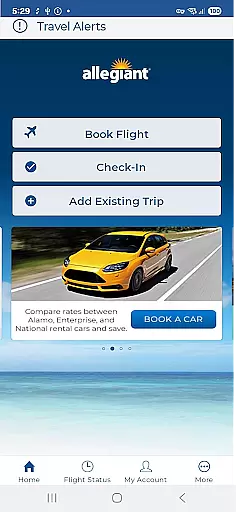
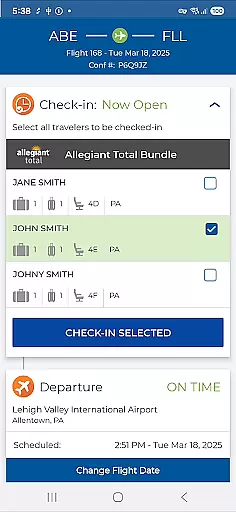
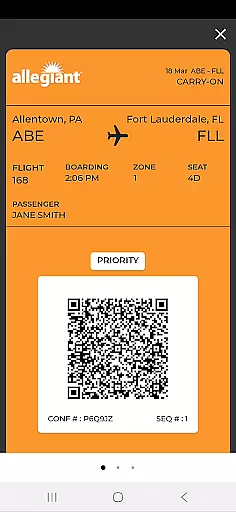
Allegiant is the official mobile application for Allegiant Travel and Allegiant Airlines, designed to enhance your travel experience. The app allows users to book flights and manage their trips efficiently through an intuitive timeline interface. Each trip phase is displayed as a card, enabling passengers to check in, view boarding passes, and access departure and arrival information seamlessly. This comprehensive tool ensures that travelers can navigate their journeys with ease while enjoying various self-service features.
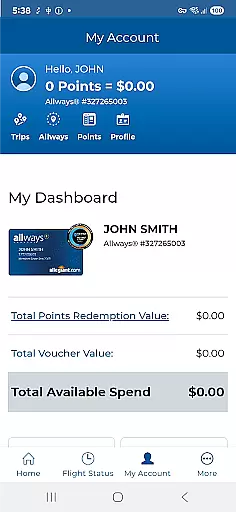
In addition to managing trips, Allegiant offers functionalities such as seat selection, baggage purchase, and priority boarding upgrades. Users can also enable automatic downloads of their trips by logging into their My Allegiant account. With real-time flight status notifications and feedback options, this app provides a complete travel solution that saves time and reduces paper usage, making it an essential companion for modern travelers.
Allegiant stands out with its innovative card-based timeline system, which simplifies trip management by breaking down each journey phase into manageable sections. This feature allows users to interact directly with their travel plans by tapping on individual cards to perform actions like checking in or viewing boarding passes. Such an approach not only streamlines the process but also enhances user engagement and understanding of their itinerary.
Beyond basic functionalities, Allegiant includes advanced features such as automated trip downloads when logged into a My Allegiant account, seat customization, and additional services like baggage purchases and priority boarding. Real-time notifications keep passengers informed about any changes or updates to their flights. Furthermore, the app promotes eco-friendly practices by minimizing paper use, allowing passengers to breeze through airports without printing documents. These combined elements create a robust platform catering to both convenience and sustainability in travel.
Booking authenticity is a crucial feature for any travel app, ensuring that all reservations and transactions are legitimate and trustworthy. Allegiant Travel & Allegiant Airlines' official app provides a secure platform where passengers can book their flights with confidence. The app connects directly to the airline's booking system, ensuring that every reservation made is accurate and confirmed.
The app allows users to manage their trips seamlessly through an intuitive card-based timeline. Each phase of the journey is represented as a card, allowing passengers to follow their trip effortlessly. By tapping on these cards, users can access detailed information about their bookings, make changes if necessary, and receive real-time updates regarding their flights.
Passengers using the Allegiant mobile app benefit from enhanced security features such as automatic downloads of trips onto their mobile phones when logged into their My Allegiant account. This ensures that all travel details are safely stored and easily accessible at any time. Additionally, important flight status notifications keep travelers informed about any changes or delays, enhancing peace of mind during their journeys.
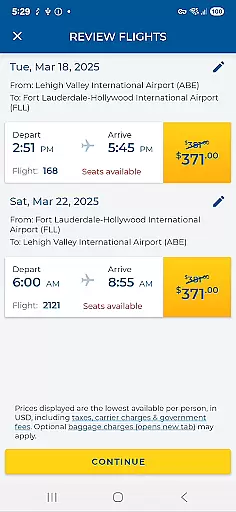
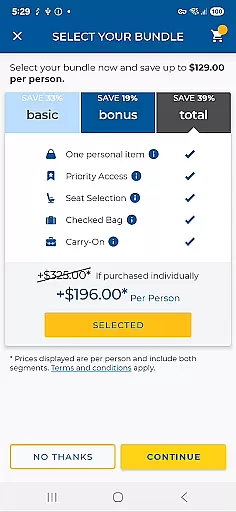
Price transparency is essential in the travel industry, providing customers with clear insights into costs associated with their bookings. The Allegiant app excels in this area by offering comprehensive pricing details throughout the booking process. Users can view exact prices for flights, additional services like seat selection, baggage fees, and priority boarding options before finalizing their purchases.
Through its user-friendly interface, the app enables passengers to review upcoming trips and add various services according to their preferences. Whether itu2019s purchasing extra luggage allowance or upgrading to Priority Boarding, users have full visibility into what they are paying for. This level of transparency empowers travelers to make informed decisions based on their budgetary needs.
Moreover, utilizing the Allegiant mobile app not only enhances convenience but also helps save money. By taking advantage of digital solutions such as electronic boarding passes and self-service functions, passengers avoid unnecessary expenses related to traditional paper tickets. Overall, the app's commitment to price transparency ensures a hassle-free experience while maintaining customer trust and satisfaction.
User-friendly interface
Comprehensive trip management
Real-time notifications
Eco-friendly paperless options
Self-service functionalities
Limited offline functionality
Occasional bugs reported
Requires account login
Additional fees for upgrades
Ads within the app


Locate and navigate to local holiday displays
 4.2
4.2
The Official Freedom Trail Foundation app.
4.30
View US public land boundary maps on your device.
3.70
A tool for outdoor activities.
4.30
Vacationing on CARNIVAL? Maximize your fun on board with the ultimate cruise app
4.60
Maximize your cruise vacation with the Royal Caribbean app
4.70
Find the perfect vacation rental. Search from over 2 million properties.
4.80
Get the app that knows where you’re going - view your flight, check in & more
4.50
Now you can book homes, experiences, and services—all in our redesigned app.
4.40
Bus tickets at unbeatable prices with routes across the US. All aboard FlixBus!
4.70
The United app puts valuable travel information in the palm of your hand.
4.70
Easily rent a car at over 9,500 locations with the Enterprise car rental app.
4.60
Take JetBlue everywhere you go! Book, manage and check in for your trips & more.
4.60
Walt Disney World Resort maps, wait times, tickets, dining & more.
4.50
Maps, Wait Times, Park Hours
4.40
INDOT Trafficwise is a traffic and traveler information mobile app.
4.00
Real-time flight tracking with live maps and flight status updates.
3.70
A Camino de Santiago Guidebook from St. Jean Pied de Port to Santiago
3.60
Everything you need for your trip in one place with the Volaris app.
3.60


User Reviews