

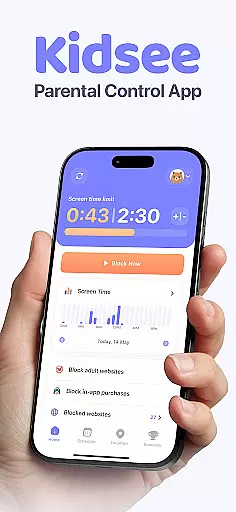
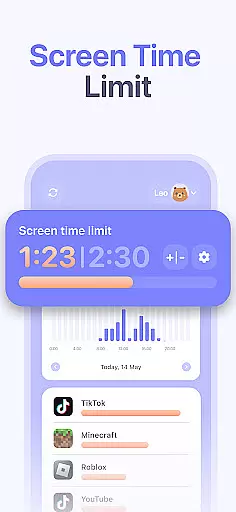
Kidsee Parental Control is a comprehensive family safety solution designed to help parents manage their children's digital habits while ensuring their safety. The app offers flexible screen time controls, allowing parents to set daily limits, block specific apps, and create custom schedules for different activities.
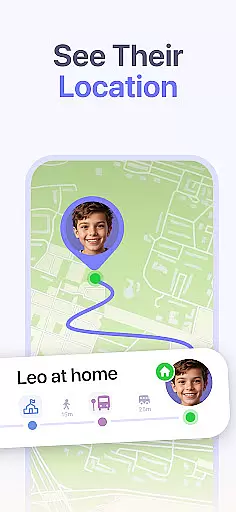
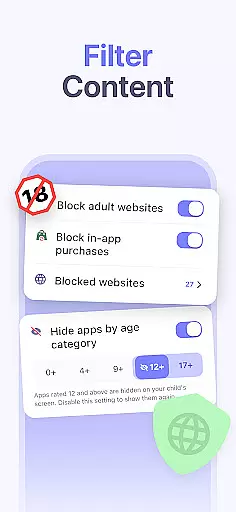
With real-time GPS tracking, parents can monitor their child's location and view location history. The app also provides content filtering features that automatically block adult websites and in-app purchases. Supporting both Android and iOS devices, Kidsee enables parents to manage multiple children from a single account, making it an ideal choice for modern families looking to promote healthy technology use.
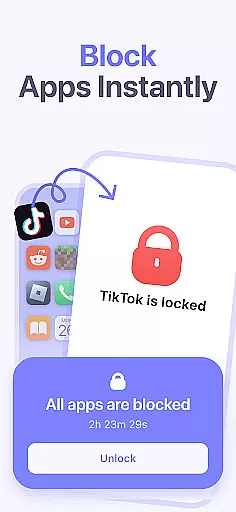
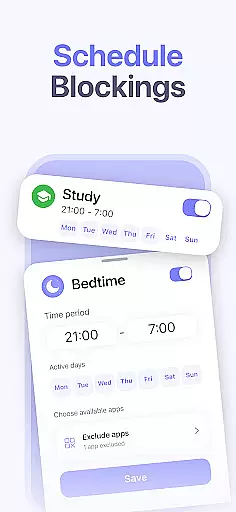
Kidsee stands out with its robust combination of screen time management, GPS tracking, and content filtering capabilities. Parents can remotely lock apps, set precise time limits for device usage, and even exclude educational apps from restrictions. The app's scheduling feature allows customization by day of the week, accommodating school hours, bedtime routines, and weekend activities.
The GPS tracking functionality provides peace of mind by showing real-time location and maintaining location history. Parents can also monitor their child's phone battery level to maintain connection. With support for up to 10 child devices and cross-platform compatibility, Kidsee offers a versatile solution for families with multiple children using different devices.
When it comes to parenting apps, the credibility of the content and validation by experts is crucial. Kidsee Parental Control ensures that all features are designed with family safety in mind, promoting digital wellbeing and healthy screen habits. The app's ability to block adult content and manage screen time is backed by research on child psychology and digital addiction prevention.
The app provides parents with tools such as real-time GPS tracking and app usage monitoring, which are essential for ensuring a child's physical and digital safety. These features have been developed based on best practices in child safety and online protection, giving parents peace of mind while their children navigate the digital world.
Kidsee's approach to managing multiple child devices from a single parent account reflects an understanding of modern family dynamics. By allowing parents to set custom schedules and limits, the app supports a balanced lifestyle that includes educational and recreational screen time. This balance is key to fostering a healthy relationship with technology among children.
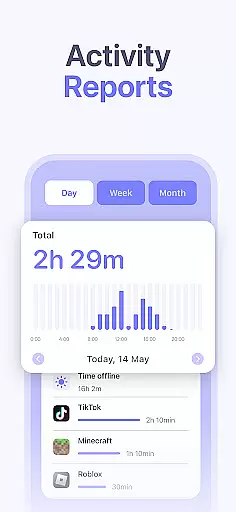
Growth tracking in parenting apps refers to the ability to monitor a child's development in various aspects, including digital habits. Kidsee Parental Control offers accurate tracking of app usage and screen time, providing parents with detailed reports on their child's digital activities. This data empowers parents to make informed decisions about their child's screen time allowances and restrictions.
The precision of Kidsee's growth tracking is evident in its ability to display location history and battery levels, ensuring that parents can maintain a reliable connection with their children. The app's analytics help identify patterns in behavior, enabling proactive measures against overuse or exposure to inappropriate content.
By supporting both Android and iOS devices, Kidsee ensures that its growth tracking capabilities are accessible to a wide range of families. The app's cross-platform functionality allows for consistent monitoring regardless of the device type, making it a versatile tool for parents seeking to guide their children's growth in today's digital age.
Comprehensive parental controls
Real-time GPS tracking
Supports multiple devices
Blocks inappropriate content
Flexible scheduling options
Requires constant internet
Premium subscription needed
Limited iOS functionality
Setup can be complex
Some features need permissions
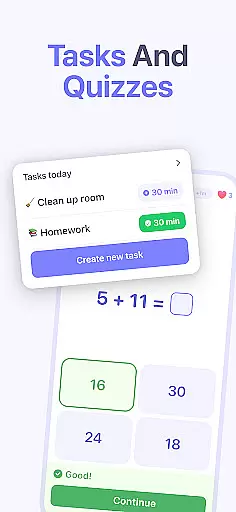

All-in-one pregnancy app, contraction timer, kick counter & due date calculator
 4.40
4.40
Track Pregnancy, Baby Feeding, Sleep, Diaper Changes, Postpartum Health & More!
4.80
Parental Control including Screen time control, GPS tracking, App/Game blocker.
3.90
Limit screen time, Block Apps & Games, Monitor with Parental control app
4.20
Join over 1MM parents & professionals who've used OFW to navigate co-parenting
4.40
Findnumber: Real-time location tracker for ultimate family security
4.20
GPS tracker app: Simple GPS phone tracker for fast family location tracking
4.60
Track baby’s development & growth week by week with BabyCenter’s pregnancy app!
4.90
FamilyAlbum helps you share, save, and remember your child's special moments.
4.80
A simple way to track your baby’s breastfeeding, diaper changes, sleep patterns.
4.90
SENSORYSOOTHE and SENSORSAFE: Making car seats smarter and families safer.
4.70
Real-time family location with consent, check-ins & SOS—private by default.
4.40
Comprehensive Parental Control & Child Safety — Hear & Protect Your Child World
4.30
Keep Your Family Safe with Pollog Family Assistants
4.10
Educational resource for parents to inspire creativity in their children.
4.00
Save money on diapers. Get the Pampers Rewards app.
3.90
Little loved one's monitoring, Sleep tracking and Parenting content.
3.80
Discover fun videos, kids songs, bedtime stories and games
3.60
Lullabies, Night Light & Age-based Routines to help your baby fall asleep
4.4

User Reviews