

McDonald's app is a comprehensive food and beverage management tool that allows users to order, earn rewards, and access exclusive deals. The core functionality revolves around Mobile Order & Pay, MyMcDonald’s Rewards, and McDelivery services. Users can conveniently place orders through the app, customize their meals, and choose from multiple pickup options including Drive Thru, Curbside, or delivery. Additionally, the app provides a restaurant locator feature for finding nearby McDonald's locations along with store hours.
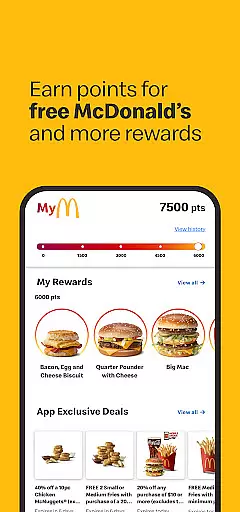
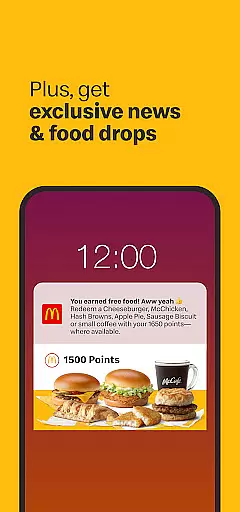
The app stands out with its loyalty program, MyMcDonald’s Rewards, enabling customers to earn points on every purchase that can be redeemed for free food and other rewards. This creates an engaging experience by offering users tangible benefits for their continued patronage. Whether you're looking to save time by ordering ahead or seeking special deals tailored to your preferences, McDonald's app delivers a complete solution for fast food enthusiasts.
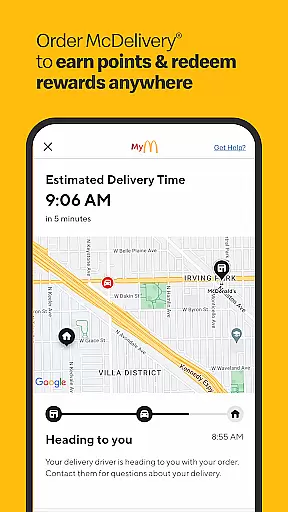
One of the standout features of the McDonald's app is its robust integration of various ordering methods. With Mobile Order & Pay, users can place their orders remotely and select from multiple pickup options such as Drive Thru, Curbside, or in-store pickup. This flexibility ensures that customers can get their favorite meals exactly how they want them without any hassle. Furthermore, the app supports McDelivery, allowing users to track their deliveries in real-time while also earning reward points.
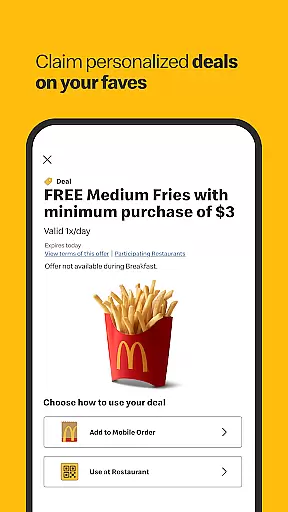
Another significant feature is the MyMcDonald’s Rewards program which incentivizes frequent visits by letting users earn points on every purchase. These points can then be redeemed for free food items and other exciting rewards. Additionally, the app offers exclusive deals tailored specifically for app users, enhancing customer engagement and satisfaction. The ability to customize and save favorite orders adds another layer of personalization, making future purchases quicker and easier. Lastly, the built-in restaurant locator helps users find nearby McDonald's locations effortlessly.
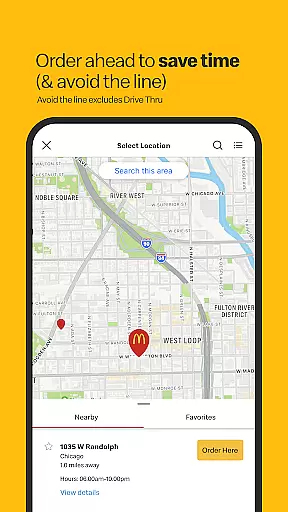
The McDonald's app offers a comprehensive store locator feature that helps users find the nearest McDonald's restaurant with ease. This functionality is crucial for customers who are looking to dine in, pick up orders, or use services like McDelivery. By simply opening the map within the app, users can quickly identify nearby locations, view store hours, and access essential restaurant information.
What sets this store locator apart is its accuracy and user-friendly interface. The app uses advanced geolocation technology to ensure that the displayed restaurants are close to the user's current location. Additionally, it provides detailed information about each outlet, including operating hours, contact details, and available services such as Drive Thru or Curbside pickup. This level of detail allows customers to plan their visits more effectively and choose the most convenient option based on their needs.
For frequent McDonald's visitors, having a reliable store locator at their fingertips significantly enhances the overall experience. Whether traveling in unfamiliar areas or simply looking for the closest 24-hour McDonald's during late-night cravings, this feature ensures that help is always just a tap away. Moreover, by integrating seamlessly with other app functionalities like Mobile Order & Pay, it creates a cohesive ecosystem that streamlines the entire customer journey from order placement to pickup.
McDonald's app excels in providing flexible delivery and pickup options through its innovative features. With Mobile Order & Pay, customers can place their orders ahead of time and select from various pickup methods including convenient Drive Thru, Curbside pickup, or home delivery via McDelivery. This versatility caters to different customer preferences and situations, making fast food even faster and more accessible.
The app's integration with McDelivery takes convenience to another level by allowing users to track their orders in real-time while earning points for future rewards. For those opting for pickup, the ability to customize orders u2013 such as specifying no pickles on burgers u2013 ensures that personal preferences are met without any hassle. Furthermore, exclusive deals available through Mobile Order & Pay make these services not only convenient but also cost-effective.
These combined delivery and pickup solutions address modern consumers' demand for speed, customization, and value. By offering multiple fulfillment options within a single platform, McDonald's app successfully bridges the gap between digital ordering and physical restaurant experiences. This approach not only saves customers time but also enhances satisfaction by giving them control over how they receive their meals, whether dining at home or grabbing a quick bite on the go.
User-friendly interface
Comprehensive rewards system
Multiple pickup options
Exclusive deals and offers
Real-time order tracking
Higher delivery prices
Requires registration
Data rates may apply
Incompatible with smartwatches
Limited international support

Easy and fast ordering, improved customization, and an enhanced guest experience
 4.20
4.20
Restaurant Reservations
4.90
Discover. Create. Plate.
4.40
Conveniently order food ahead and avoid the wait at your favorite Jersey Mike's.
4.80
Find the perfect restaurant for any occasion on OpenTable.
4.60
NEW digital gift cards available in exclusive designs!
4.60
Eating fresh just got a whole lot better with the new Subway app.
4.20
EASIEST WAY TO PIZZA®
4.70
Food Delivered to your door! Order from 1800+ Grocery & Retail Store Brands.
4.10
Bringing a piece of Louisiana to your fingertips!
4.90
Save at the pump AND in store with deals on gas, snacks & drinks at Murphy USA.
4.80
Enjoy all your Legendary favorites at Texas Roadhouse!
4.80
Easily Order, Earn Crumbs & Unlock Rewards!
4.80
Choose From A Wide Array of Wines, Spirits, Beers & More
4.60
Earn rewards when you order online for delivery or pickup from Sonic Drive-In.
4.60
Order your Buffalo Wild Wings favorites for takeout & delivery
4.50
Delicious cocktail recipes you can make with ingredients you already have.
4.40
Krispy Kreme Mobile Ordering, Loyalty and Hot Light
3.20
Order ahead. Earn Delicious Rewards.
3.20


User Reviews