

Look Up - Pop Up Dictionary Pro is an innovative offline dictionary application designed for book lovers and language enthusiasts who value efficiency and convenience. The app eliminates the need to search words online by providing instant definitions directly within your reading environment.
With support for seven languages including English, Italian, Spanish, German, Portuguese, and French, Look Up offers versatile functionality that caters to a global audience. Its integration with popular apps like Moon Reader and Anki Flashcards makes it an indispensable tool for both casual readers and serious language learners.
The app's unique features such as three different word lookup methods, offline Wordnet database with 0.22 million entries, and synchronization with Google Drive make it particularly valuable for students and professionals who require reliable access to vocabulary resources anytime, anywhere.
Look Up stands out through its comprehensive feature set tailored for enhanced learning and productivity. The application's core strength lies in its robust offline capabilities, powered by an extensive Wordnet database containing 0.22 million words and phrases, ensuring users have access to crucial information without internet dependency.
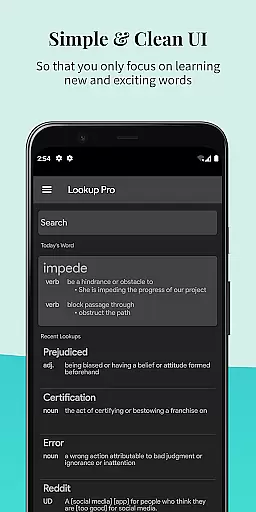
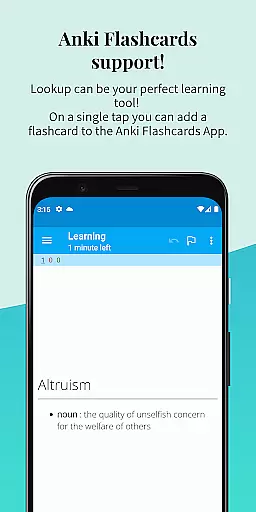
The app's integration with various plugins including Urban Dictionary, Wikipedia, and Cambridge extends its functionality beyond basic definitions. Features like Anki Flashcard support, word starring system, and note-adding capability enable users to create personalized learning experiences. The inclusion of dark mode, text-to-speech functionality, and material design aesthetics enhances user comfort during extended study sessions.
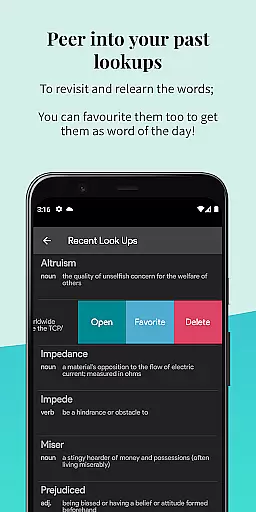
Additional innovative features include automatic word syncing to Google Drive, recent word history tracking, and a 'Word of the Day' notification system that helps users expand their vocabulary consistently. These elements combine to create a powerful educational tool that adapts to various learning styles and preferences.
Look Up - Pop Up Dictionary Pro offers an extensive offline word database that includes 0.22 million words and phrases, ensuring users have access to a comprehensive reference tool without needing an internet connection. This vast repository reflects the app's commitment to providing a rich e-book library equivalent for language and vocabulary.
The dictionary supports multiple languages such as English, Italian, Spanish, German, Portuguese, and French, affirming its wide-ranging utility across different linguistic demographics. With this multilingual support, Look Up caters to an international audience, enhancing its value as a universal reference app.
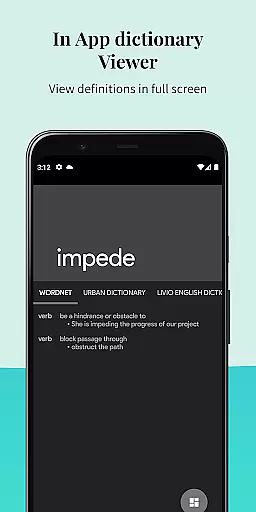
Moreover, Look Up incorporates authoritative sources like Urban Dictionary, Google Define, Vocabulary.com, Wikipedia, and Cambridge, which bolsters the credibility of the content provided. Users can trust in the authenticity of their searches, akin to accessing a well-regarded e-book library where copyright is respected and maintained.
By allowing users to star words they wish to remember and add personal notes, Look Up functions not just as a static dictionary but as a personalized lexicon that grows with the useru2019s learning journey, much like building a custom library of knowledge tailored to individual needs.
Look Up - Pop Up Dictionary Pro excels in format compatibility by integrating seamlessly with various applications and services, thus enhancing its utility as a versatile reference tool. Its compatibility with Moon Reader for dictionary support and Anki for flashcard creation allows users to incorporate Look Up into their existing study and reading workflows effortlessly.
With three distinct methods for word searchu2014copying a word, pressing the lookup button after selecting a word, or sharing the selected word to the Lookup Appu2014the application ensures broad device and Android version support. This flexibility makes it accessible whether you're using an older Android version or the latest one.
Furthermore, Look Up provides options for syncing to Google Drive, adding notes to words, and even speaking the word aloud, which enriches the user experience by catering to various learning styles and preferences. These features ensure that regardless of how a user prefers to engage with content, Look Up is adaptable to those needs.
Including a dark mode for comfortable nighttime reading and material design with visually appealing text further demonstrates Look Upu2019s dedication to supporting diverse user environments and aesthetic preferences, making it a highly compatible and user-centric reference application.
Comprehensive offline database
Multi-language support
Seamless app integrations
Intuitive user interface
Regular feature updates
Premium version required
Occasional sync issues
Limited advanced grammar tools
Storage space requirement
Learning curve for new users


Contains the 365 daily readings and everything other thing needed for catholics
 4.70
4.70
Cute bedtime story for kids
4.30
CleverBook Pro makes the popular guide for the game even better!
4.00
Pretty Moon information App with Complications and Tile
4.30
Master AKC Rally signs with in-depth hints, diagrams, and expert guidance.
4.50
WebNovel - Read Solo Leveling novel and comic
4.10
Full text, sheet music, and recordings of the print edition
4.60
Provides location information of vehicle Shift Interlock releases.
4.30
A Comprehensive Restoration of Sacred Scripture
4.50
Daily Devotional Widgets & Hourly Verses. Listen to Bible & Watch Holy Stories
4.70
Crowd-sourced listing of businesses with anti-gun signs, and pro-2a alternatives
4.60
Words spoken by native English speakers and full definitions.
4.60
The Original & Authentic Crystals, Gemstones, Rocks & Minerals Encyclopedia.
4.60
Read the Quran in Arabic alongside its translation, with color coded Tajweed.
4.50
Bible Spiritual Companion
4.40
A wonderful reader for good time spend.
4.20
Read Trending Romance Stories
4.00
Enjoy your favorite books
3.50
Novels, audiobooks, ebooks & fanfiction. Read anytime, anywhere!
3.40

User Reviews