

TeamSnap is a leading Sports Management app designed for coaches, sports organization administrators, and parents involved in youth sports. This powerful tool simplifies the complex operations of managing sports teams, clubs, or leagues by centralizing communication, registration, payment collection, scheduling, and team management into one platform.
The app's standout feature is its ability to replace scattered group text chains and separate payment apps with a unified system that keeps everyone informed and organized. Whether it's sending game updates, collecting fees, or planning practice sessions, TeamSnap ensures that all stakeholders can focus more on playing and less on organizing. With over 24 million users globally, it supports various sports including soccer, ice hockey, baseball, basketball, and more.
For coaches, TeamSnap offers efficient communication tools, roster management, availability tracking, and scheduling capabilities. Administrators benefit from streamlined communication across entire clubs or leagues, smarter scheduling options, integrated registration processes, financial management features, and accurate rostering tools. By consolidating these essential functions, TeamSnap empowers teams to enhance player development and deliver an exceptional sports experience.
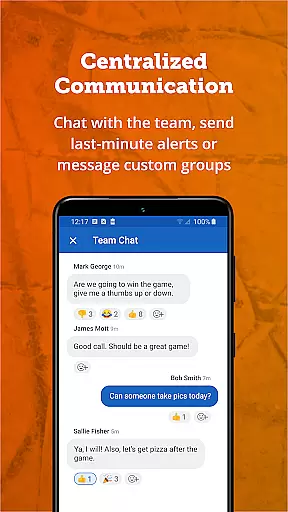
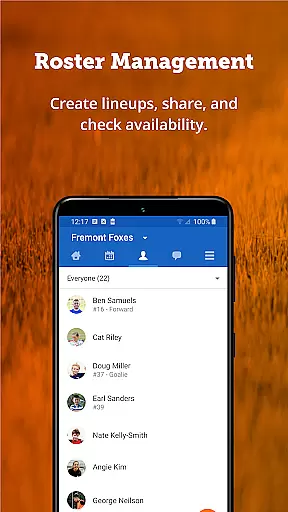
TeamSnap boasts a comprehensive set of features tailored to meet the needs of both coaches and sports organization administrators. For coaches, the app provides robust communication tools such as individual or group messaging, push notifications, and SMS alerts, ensuring that parents and players are always informed. The roster management functionality allows for building teams, collecting player details, setting game-day lineups, and maintaining contact information in one centralized location.
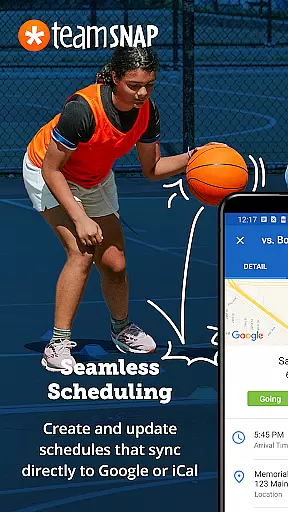
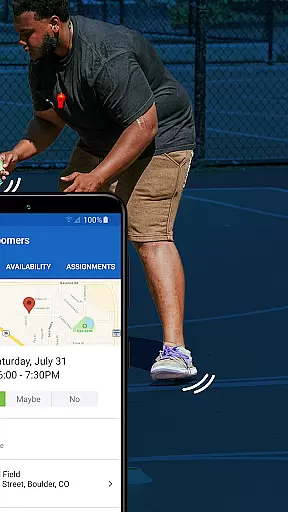
Scheduling is made simple with TeamSnap's intuitive tools that enable easy creation or importation of schedules, ensuring everyone knows where and when practices or games are happening. The Availability feature helps coaches plan effectively by tracking who will attend upcoming events. Additionally, real-time game updates and Postgame Reports allow teams to stay connected, track player statistics, share photos, and store memories.
Administrators enjoy advanced capabilities like streamlined communication across entire clubs or leagues, automated scheduling, and event editing tools. The integration of registration forms collects necessary player information, documents, and waivers seamlessly. Financial management features ensure timely payments through direct bank deposits and provide detailed financial reports. Lastly, the rostering process is automated yet flexible, allowing manual adjustments based on registration details while offering a holistic view of member information.
Gameplay realism and physics accuracy are crucial for sports management apps like TeamSnap. These features ensure that the digital representation of real-world activities is as close to reality as possible.
TeamSnap achieves this by offering precise scheduling tools, real-time updates, and detailed player statistics. The app's scheduling feature allows coaches to plan practices and games with exact timing and location details, mimicking the structured nature of actual sports events.
The real-time game updates and postgame reports provide a dynamic and interactive experience, similar to live sports coverage. This keeps users engaged and informed, just as if they were physically present at the event.
By integrating these realistic elements, TeamSnap enhances user satisfaction and engagement, making it an indispensable tool for managing youth sports teams effectively.
Control scheme intuitiveness refers to how easily users can navigate and utilize an app's features. For TeamSnap, this means providing a seamless and user-friendly interface that simplifies sports management tasks.
TeamSnap excels in this area by offering straightforward communication tools. Coaches and parents can send individual or group messages, push notifications, and SMS alerts effortlessly, ensuring everyone stays informed.
The app also simplifies roster management and scheduling. Coaches can build teams, collect player details, and set game-day lineups with ease, all within a single platform. This intuitive design reduces the learning curve and enhances productivity.
Ultimately, TeamSnap's intuitive control scheme empowers users to focus on what truly mattersu2014developing players and delivering a great sports experienceu2014without being bogged down by complex software operations.
User-friendly interface
Comprehensive feature set
Wide sport compatibility
Efficient communication tools
Robust financial management
Premium subscription required
Occasional syncing issues
Limited free version
Steep learning curve
Dependent on internet connectivity




Social casino meets sportsbook - more than a bet app for social sports betting!
 4.60
4.60
Modern arcade style pool game with single player, Relaxed game of 8 ball.
4.60
Play the hit multiplayer Carrom Disc Pool board game and become the best!
4.60
Old-School Football
4.40
Feel the thrill of American football: guide a team to triumph through touchdowns
4.40
Play the 3 classic Duck Life games like you've never seen them before!
4.10
For Fans to Buy Tickets
4.80
Stream Formula 1® Live and on-demand
4.40
The NFHS Network delivers high school sporting events from across the country.
3.70
Solunar Fishing Times by Fishingreminder.com
4.80
Soccer mini games! Play career mode: Score & be the next soccer superstar!
4.70
Real boxing game with PvP fights, tournaments & epic knockouts
4.60
Play the World's Soccer Game Anywhere with Premier League, UCL & LALIGA stars.
4.60
Create your own gym, train boxers, and aim for the championship!
4.50
Build your dream soccer team!
4.50
Mobile Team Manager: Team Chat | Schedule Team Games | Build Player Roster
4.50
Rediscover the joy of the original Backyard Baseball 1997
3.70
The King of Retro Soccer!
3.60
Play T20 Cricket World Cup 2025. Real matches, offline & tournament mode!
4.0


User Reviews