
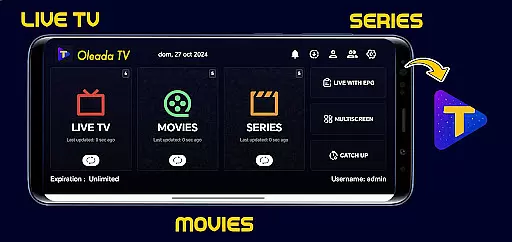
Oleada TV is an innovative IPTV player designed to provide users with a neutral platform for uploading and playing their own multimedia content. The app does not come preloaded with any movies or series, ensuring a completely user-driven experience.
With its strict focus on legality and user responsibility, Oleada TV offers a secure environment where users can independently load files and links for playback. This makes it an ideal solution for those seeking a customizable entertainment experience without any pre-existing content.
The application's value lies in its ability to serve as a dedicated multimedia player while maintaining complete neutrality regarding content sources. Users can enjoy peace of mind knowing they are in full control of their viewing material.
Oleada TV distinguishes itself through several key features that enhance the user experience. First and foremost, its core functionality as a neutral multimedia player ensures that users maintain complete control over their content choices.
The application implements robust security measures by neither hosting nor transmitting any audiovisual materials. This approach guarantees that users bear sole responsibility for their content selections, promoting legal and authorized usage.
Additionally, Oleada TV provides comprehensive disclaimers and clear terms of use, establishing transparent guidelines for proper application utilization. These features collectively create a safe and customizable entertainment environment while protecting both users and developers from potential legal issues.
In the realm of digital entertainment, content variety and freshness are pivotal for user engagement. Oleada TV positions itself as a versatile IPTV player that allows users to upload their unique content, ensuring that the material remains fresh and personalized. This approach not only diversifies the type of content available but also keeps the platform dynamic and ever-changing.
Unlike traditional media platforms, Oleada TV does not preload movies or series, leaving the content selection entirely in the hands of its users. This strategy empowers users to dictate the trends and popular content within their community, making each interaction with Oleada TV potentially unique and reflective of current personal interests.
The application's role as a neutral multimedia player means it can adapt to various content types without bias, further enhancing the diversity of entertainment options. Users can explore different genres, discover new content creators, and enjoy an evolving library that reflects their individual preferences and those of their peers.
By focusing on user-driven content, Oleada TV ensures that its platform remains at the cutting edge of entertainment trends. The constant influx of user-generated material guarantees that viewers have access to the latest and most relevant content, tailored specifically to their tastes and interests, thus maintaining high levels of engagement and satisfaction.
User engagement duration and retention are critical metrics for evaluating the success of any entertainment platform. Oleada TV, by allowing users to independently load their content, creates a personalized experience that encourages longer viewing sessions and repeat usage. This customization fosters a deeper connection between the user and the platform, leading to increased retention rates.
The responsibility placed on users to add, load, or play content through Oleada TV instills a sense of ownership and investment in their viewing experience. When users actively participate in curating their entertainment library, they are more likely to spend extended periods interacting with the application and return frequently to update or expand their collection.
Oleada TV's legal framework reinforces positive user behavior by promoting the playback of authorized content. By agreeing to use the platform solely for legitimate purposes, users contribute to a safe and respectful community environment, which enhances overall satisfaction and loyalty to the service.
Furthermore, the application's disclaimer and focus on user responsibility create clear guidelines for appropriate use, reducing potential conflicts or dissatisfaction. This transparent approach builds trust and encourages sustained engagement, as users feel confident in the platform's commitment to legality and ethical standards while enjoying their personalized entertainment options.
User-controlled content
Neutral multimedia player
Legal protection emphasis
Customizable experience
Clear terms of use
No preloaded content
Limited entertainment options
User responsibility heavy
Technical knowledge required
Potential misuse risk

Practice and master your ESP and intuition with five mode trainer.
 4.20
4.20
Triple A is a highly complex, kinetic, and interactive visualizer.
4.50
Find out if you're on Santa's Naughty or Nice List with this magical scanner!
4.60
The JBL Portable app works with JBL portable Bluetooth speakers.
4.60
Underrated short-drama gems that hit hard and keep your heart hooked.
4.50
Your choice of 350+ networks plus movies and full TV series on-demand.
3.70
Official KennysGifs Stickers
4.20
Earn Real Rewards Playing Fun Mobile Games & Easy Cash Out - PayPal & Gift Cards
4.40
Pop Drama is a premier app crafted for short drama lovers
4.60
Hand-drawn, cartoon OC creator - original character creator
4.70
Premium version to enjoy your favorite anime
4.60
Watch short films, dramas, reels, series and movies anytime on Micro Drama.
4.60
Stream Online TV - Watch Live IPTV Playlist & Channel with Built-In Player
4.50
Fetch money rewards all just for playing games. Cash out for gift cards in app.
4.50
Just play games to earn gift cards. Keep playing, keep earning.
4.50
Himnario LLDM - Fast and Easy to read , updated Hymnal 2019 Edition Official
4.20
Start EVP/Spirit Box tonight: real EMF, offline, recording. One-time purchase.
4.10
Stream videos to VIDAA & VEWD TVs from Hisense, Sharp, Skyworth, Vestel & TiVo
3.00
With the credits you earn play more games
2.90

User Reviews