

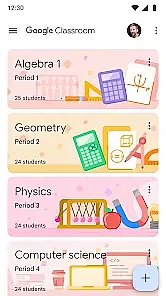
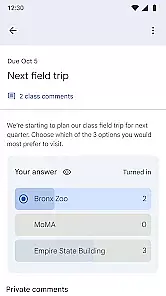
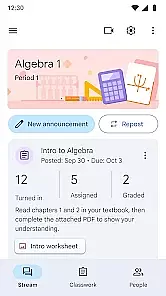
Google Classroom is an educational app designed to help teachers and students streamline the learning process. This application enables seamless communication between educators and learners, allowing for easy assignment distribution, feedback provision, and grading. With its integration into Google Workspace, users can effortlessly manage classwork and keep track of important deadlines.
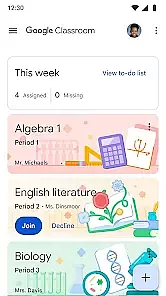
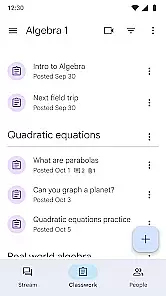
The app's intuitive interface simplifies the organization of class materials, promoting a paperless environment that enhances accessibility and collaboration. Whether in a physical classroom or engaging in remote learning, Google Classroom ensures that educational resources are just a tap away, fostering an interactive and efficient learning experience.
One of the standout features of Google Classroom is its seamless integration with other Google services such as Google Docs, Sheets, and Drive. This interconnected ecosystem allows for effortless file sharing and collaborative workspaces where students and teachers can interact in real-time. The app also supports various multimedia formats, enabling diverse content creation and sharing options.
Additionally, Google Classroom offers robust notification settings that ensure users never miss important updates or deadlines. Teachers can customize assignments, provide timely feedback, and monitor student progress through an easy-to-navigate dashboard. These comprehensive tools empower educators to create engaging lessons while facilitating better academic outcomes for their students.
In the realm of educational applications, content authority and curriculum alignment are crucial for ensuring that learning is both effective and relevant. Google Classroom, as an Educational app, excels in these areas by providing a platform where educators can design and distribute assignments that align with established educational standards.
The app allows teachers to create lessons that adhere closely to curriculum guidelines, thus maintaining the authority of the content delivered to students. This ensures that learners receive information that is not only accurate but also pertinent to their academic progress and assessment criteria.
For users, this means that every assignment or material shared through Google Classroom is intended to meet specific learning objectives. Students benefit from receiving structured content that supports their educational journey, preparing them effectively for examinations and future academic challenges.
Ultimately, the alignment with authoritative curricula empowers educators to leverage Google Classroom as a tool for delivering high-quality education, bridging classroom learning with digital resources seamlessly while upholding rigorous academic standards.
Gamification in learning introduces game-like elements into educational settings to enhance engagement and motivation among students. Google Classroom incorporates gamification-learning integration by offering features that make learning more interactive and enjoyable without compromising educational value.
Through functionalities such as assigning grades, providing feedback on assignments, and tracking student progress, the app creates an engaging environment akin to gaming experiences. These features encourage students to complete tasks promptly while striving for better performance based on the incentives provided within the system.
Users benefit from increased motivation as they navigate through their coursework. The sense of achievement gained from completing assignments and receiving recognition for their efforts fosters a positive attitude towards learning. This approach not only makes education more appealing but also helps maintain consistent participation from students.
By integrating gamified elements thoughtfully into its framework, Google Classroom successfully enhances user engagement while ensuring that all activities contribute meaningfully towards educational goals, setting a benchmark for innovative learning solutions.
User-friendly interface
Seamless Google integration
Real-time collaboration
Efficient assignment management
Supports multimedia content
Limited offline functionality
Dependent on Google services
No advanced analytics
Basic grading system
Occasional sync issues

Learn and practice multiplication and division
 4.3
4.3
Spark your little ones’ imagination!
3.80
A world for little builders to create, imagine, and learn through play.
4.20
Tons of kids safety games, cartoons, and stories are included in one kids app!
4.70
OG Munchers - Play classic Number Munchers game on Android
4.40
Join Rus and his friends to save Pear Island!
4.1
Fun game for preschoolers to learn addition, subtraction, counting and math!
4.50
Amazing learning and educational games for children of all ages.
4.70
Play safe educational games & learn with Daniel Tiger, Wild Kratts & more
4.40
Cute coloring games for girls! Draw, paint & decorate with endless colors.
4.70
Epic battles, interactive quests and exotic pets. Learn math with Prodigy today!
4.70
Fun educational games for kids that teach number tracing, counting with modes!
4.50
Fun educational jigsaw puzzles for kids and preschoolers.
4.50
Monkey Preschool Fix-It is an early learning game for ages 2 to 5.
4.40
Enjoy the fun kid's hospital play game with Cocobi, the little dinosaurs!
4.00
Cure the patients to create your hospital story!
3.90
Magical girl game where dreams come true. Collect & care for cute princesses!
3.80
Create, Style, Repeat!
3.70
Explore the world of reading and writing with Booker!
4.2


User Reviews