

GBC.emu is an advanced open-source Gameboy emulator that brings classic gaming to modern Android devices. Built on the Gambatte emulation core, it delivers exceptional performance with a focus on low audio and video latency. The app supports a wide range of devices, from legacy models like the Xperia Play to current devices such as the Nvidia Shield and Pixel phones.
Users can enjoy multiple color palettes for original GB games, apply cheat codes in popular formats, and play both .gb and .gbc files. With configurable on-screen controls and support for Bluetooth/USB gamepads, GBC.emu offers a customizable and authentic gaming experience. It's an ideal solution for retro gaming enthusiasts who want to relive their favorite titles on the go.
GBC.emu stands out with its comprehensive feature set tailored for retro gaming enthusiasts. The emulator supports multiple color palettes for original Gameboy games, allowing users to customize the visual experience. It accepts cheat codes in both Game Genie and Gameshark formats, giving players more control over their gameplay.
The app handles .gb and .gbc file formats and can process files compressed with ZIP, RAR, or 7Z. Configurable on-screen controls provide flexibility in how users interact with games, while robust support for Bluetooth and USB gamepads ensures compatibility with various HID devices. This includes popular controllers like Xbox and PlayStation models, making it versatile for different gaming preferences.
Arcade authenticity and nostalgia are crucial elements for any gaming emulator, as they ensure the original experience is faithfully recreated. GBC.emu achieves this by offering a minimalist UI that focuses on low audio and video latency, providing an immersive experience akin to playing on original Game Boy hardware.
The emulator supports both GB and GBC file formats, including those optionally compressed with ZIP, RAR, or 7Z. This versatility allows users to enjoy a wide variety of games while maintaining the nostalgic feel of classic handheld gaming. The inclusion of multiple color palettes for original GB games further enhances this authentic experience.
By supporting Android's storage access framework, GBC.emu enables seamless access to game files stored on both internal and external storage devices. This feature not only simplifies the process of loading games but also adds a layer of convenience that complements the nostalgic gameplay.
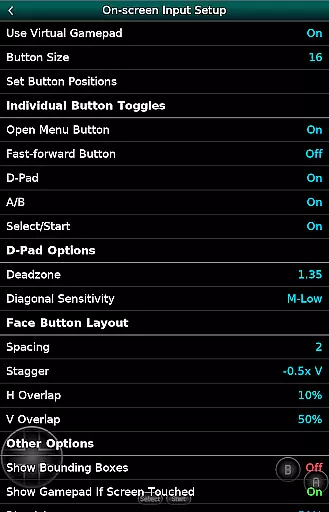
Control responsiveness is vital in ensuring a smooth and enjoyable gaming experience. GBC.emu excels in this area by providing configurable on-screen controls that can be tailored to suit individual preferences. This customization capability ensures that players can adjust the interface to their liking, enhancing overall control precision.
In addition to on-screen controls, GBC.emu supports Bluetooth and USB gamepads, as well as keyboards compatible with any HID device recognized by the OS. This includes popular controllers like Xbox and PS controllers, making it versatile for different user setups and preferences.
The combination of customizable on-screen controls and broad peripheral support results in a highly responsive and adaptable gaming experience. Players can expect tight control feedback and minimal input latency, which are essential for enjoying fast-paced arcade games without frustration.
Low audio/video latency
Wide device compatibility
Multiple color palettes
Cheat code support
Configurable controls
No ROMs included
Complex setup required
Limited user interface
Advanced technical knowledge needed
Occasional crashes reported

Dig yourself a way to gold, diamonds and success with this addictive mining game
 3.90
3.90
Play retro games with ease – NES, SNES, PSX, PSP & more supported
4.2
Sit back and relax! Tap to move the black hole, and swallow weapons to win.
4.20
Join the art challenge: Guess the word and draw fast before the timer runs out!
4.20
Local offline 2 3 4 player multiplayer minigames - race, tanks, football
4.60
Master the skies in this epic airplane shooting game! Join the air force now!
4.80
The only Sega Saturn emulator for Android
4.40
Join the breathtaking chase!
4.80
Millions of crafters have smashed billions of blocks! Now you can join the fun!
4.40
Full featured version of Pizza Boy A (GBA emulator)
4.80
Meet Snake Run Race! Slither through an obstacle course in our fun running game!
4.70
Catch ghosts, shoot monsters and defeat bosses in this RPG idle shooting game.
4.70
Use superpower in your magic hands. Defeat the enemies in a fun elemental game.
4.50
Mine & Craft Block Mini World! Survival Crafting and Building & Creative Online.
4.30
Genesis, Mega Drive, Mega CD, Master System, Game Gear Emulator!
4.20
NEOGEO's masterpiece game is now available in the app!
4.10
A Ball Bouncer With Depth
4.00
You are a Black Hole, escaping the darkness trying to swallow you!
3.60
Reach high, and shine in the neon world in 3D!
4.5
User Reviews